
Now that I’ve had my VPS for a while, here’s some more awesome projects that I’ve decided to self-host.
Grimmory - eBook server
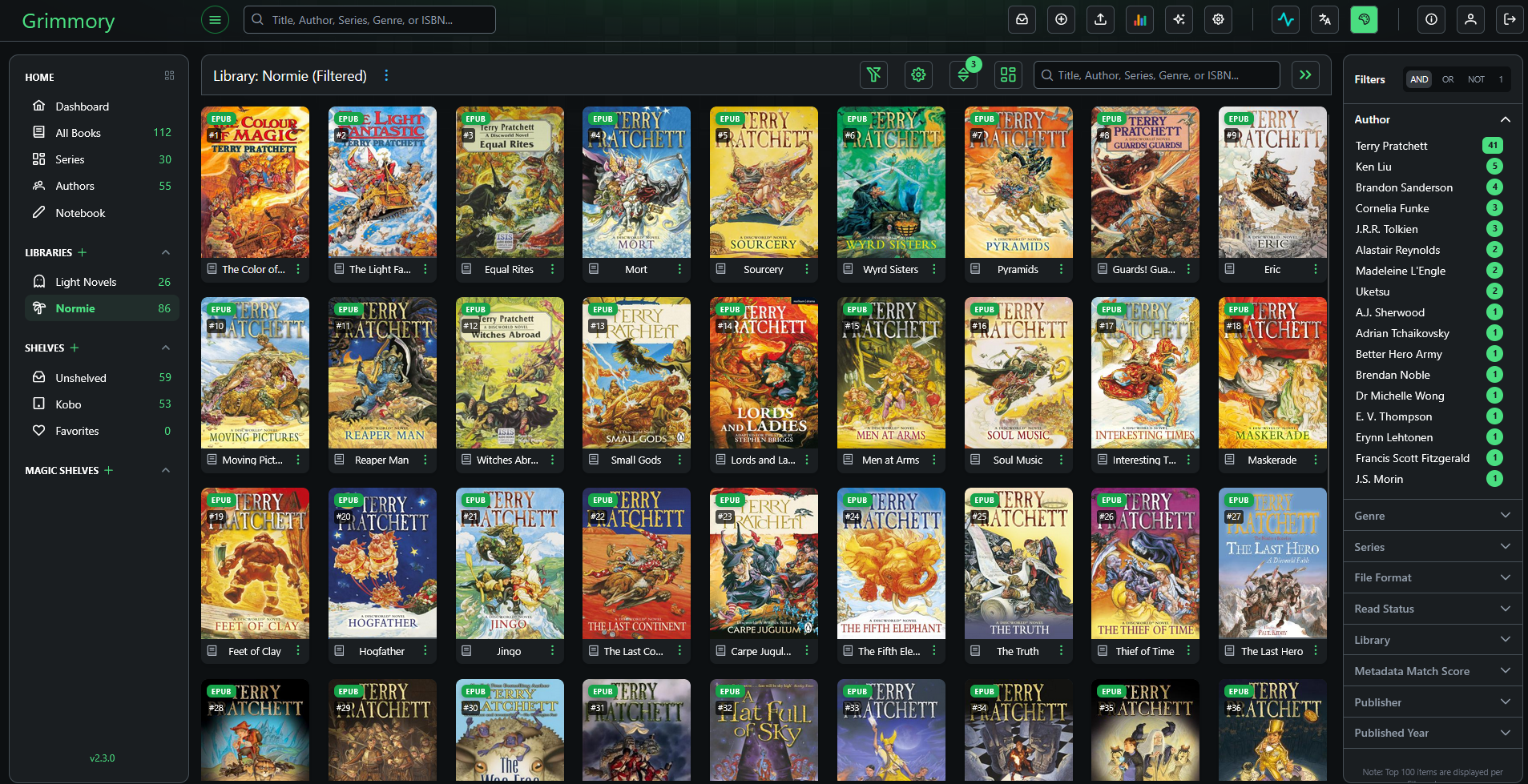
Grimmory is an ebook server that has two very important features: Native Kobo Sync and KOReader Sync!
Now instead of sideloading my books manually, I load them up in Grimmory, which acts like the Kobo store. It will sync reading status and reading progress, as well any collections or shelves you make.
It also has the ability to offer books on an OPDS (Open Publication Distribution System) feed, which is kind of like an RSS feed for books, and sync reading progress between apps and devices that use KoReader Sync.
The OPDS functionality allows me to browse my Grimmory library and download books directly to the device, which is super convenient.
KOreader sync allows me to read on my XTeink X4, and sync the progress between that and the Kobo (theoretically, the Koreader -> Grimmory sync direction is broken right now, but Kobo -> Grimmory -> Koreader works).
Because Kobo uses an sqlite database for storing reading statistics and progress, it can corrupt easily when connecting to a computer with a book open (since it leaves the database open in case you make highlights or advance in the book). I’ve had my database wiped accidentally multiple times (Installing KOReader has done this 💢), and it’s an annoying hassle. Since Grimmory stores reading progress and books status (finished, reading, unread, etc.), I don’t have to worry about that anymore. I can also still access my Kobo store purchases and use the device as normal, so I really enjoy using this software for sideloading my DRM free books!
Instapaper to OPDS
I wanted to read my instapaper articles on my XTeink device, since it doesn’t have native Instapaper integration like my Kobo does. However, I didn’t want to go to the hassle of loading the epubs up manually every single time I added an article or fanfic, so I made a tool that will serve up instapaper epubs on an OPDS feed. This feed can then be added to the XTeink, which will allow you to browse and download saved articles from the device.
Readeck - Read-it-later & Archival Service
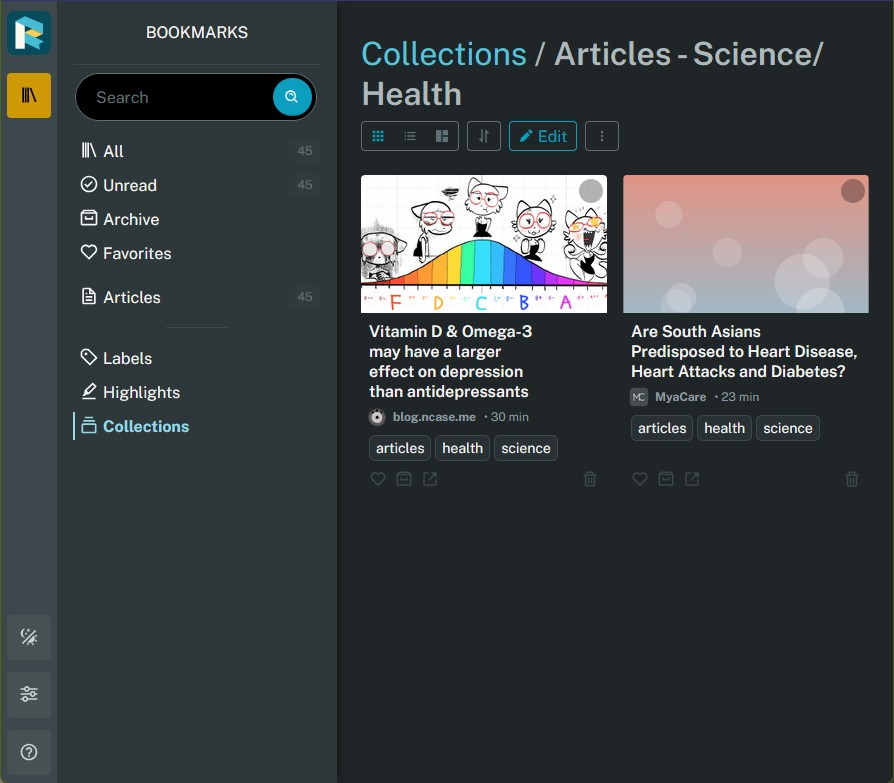
Readeck is similar to Pocket and Instapaper, you can save web pages to read later and keep forever.
Why did I install this when I already have Instapaper? Well, it’s because I wanted to use it’s archival features to save fanfics and articles “permanently” (as permanent as my VPS subscription and my backups). This is a paid feature for Instapaper, and I figure it makes more sense to self-host something that I can easily backup and control myself.
Right now, I’m using both Instapaper and Readeck at the same time. Instapaper as a read-it-later tool, Readeck as a save-forever tool. Since I went to painstaking lengths to make my AO3 Email to Instapaper tool, I’m not quitting Instapaper yet lol. Plus, not everything I send to instapaper is something I want to keep forever. I usually delete things when I’m done reading them.
Readeck Kobo Proxy

Since I’m keeping Instapaper (and it has a native integration on Kobo), I wanted a way to access my Readeck articles on Kobo without replacing the Instapaper endpoint with Readeck. 1 2
My solution was to take the OPDS feed served up by Readeck, and create a web proxy accessible from the Kobo browser that allows you to browse your articles, click to download, and have the proxy convert to kepub and serve the file up for download.
I setup a Nickelmenu shortcut that opens up the webpage, but you could also just add the site to your favorites in the kobo browser.
Below is a docker compose example with readeck and the kobo proxy files (Dockerfile, app script, and requirements).
compose.yaml
services: readeck: image: codeberg.org/readeck/readeck:latest container_name: readeck restart: unless-stopped ports: - "127.0.0.1:8000:8000" # Secured behind loopback interface for local reverse proxy ingestion environment: - READECK_LOG_LEVEL=info - READECK_LOG_FORMAT=text - READECK_SERVER_HOST=0.0.0.0 - READECK_SERVER_PORT=8000 - READECK_USE_X_FORWARDED=true volumes: - ./data:/readeck healthcheck: test: ["CMD", "/bin/readeck", "healthcheck", "-config", "config.toml"] interval: 30s timeout: 2s retries: 3
kobo-readeck-proxy: build: context: ./kobo-proxy container_name: kobo-readeck-proxy ports: - "5005:5005" environment: - READECK_URL=http://readeck:8000 # References internal service block name - READECK_PASS='your_readeck_api_token_here' depends_on: - readeck restart: unless-stopped
Dockerfile
FROM python:3.11-alpine
# Install curl to pull the binary and runtime dependenciesRUN apk add --no-cache curl
# Download and install the latest stable standalone kepubify binaryRUN curl -o /usr/local/bin/kepubify -L "https://github.com/pgaskin/kepubify/releases/download/v4.0.4/kepubify-linux-64bit" \ && chmod +x /usr/local/bin/kepubify
WORKDIR /app
COPY requirements.txt .RUN pip install --no-cache-dir -r requirements.txt
COPY app.py .
EXPOSE 5005
CMD ["python", "app.py"]
python script “app(.)py”
import osimport subprocessimport requestsimport base64import refrom bs4 import BeautifulSoupfrom flask import Flask, Response, render_template_string, request
app = Flask(__name__)
READECK_INTERNAL_URL = os.environ.get("READECK_URL", "http://readeck:8000").rstrip('/')READECK_PASS = os.environ.get("READECK_PASS", "").strip().strip("'").strip('"')
HTML_TEMPLATE = """<!DOCTYPE html><html><head> <meta charset="utf-8"> <meta name="viewport" content="width=device-width, initial-scale=1.0, maximum-scale=1.0, user-scalable=no"> <title>Readeck Browser</title> <style> body { font-family: -apple-system, BlinkMacSystemFont, sans-serif; background: #fff; color: #000; padding: 20px; margin: 0; } h2 { border-bottom: 3px solid #000; padding-bottom: 10px; font-size: 24px; margin-top: 5px; font-weight: 800; } .nav-back { display: inline-block; margin-bottom: 15px; font-size: 18px; font-weight: bold; color: #000; text-decoration: none; border: 2px solid #000; padding: 5px 12px; } ul { list-style: none; padding: 0; margin: 0; } li { padding: 18px 0; border-bottom: 1px solid #ccc; }
.cat-link { font-size: 22px; text-decoration: none; color: #000; font-weight: bold; display: block; } .cat-link::after { content: " →"; font-weight: normal; color: #666; }
.book-link { font-size: 22px; text-decoration: none; color: #000; font-weight: bold; display: block; line-height: 1.3; } .book-meta { font-size: 14px; color: #444; margin-top: 6px; letter-spacing: 0.5px; } .download-tag { display: inline-block; font-size: 12px; font-weight: bold; text-transform: uppercase; border: 1px solid #000; padding: 2px 6px; margin-top: 6px; } </style></head><body> <h2>{{ feed_title }}</h2>
{% if current_path != "opds" %} <a class="nav-back" href="javascript:history.back()">← Back</a> {% endif %}
<ul> {% for item in items %} <li> {% if item.type == 'catalog' %} <a class="cat-link" href="/?path={{ item.target_path | urlencode }}">{{ item.title }}</a> {% if item.content %}<div class="book-meta">{{ item.content }}</div>{% endif %} {% else %} <a class="book-link" href="/download?url={{ item.download_url | urlencode }}&title={{ item.title | urlencode }}">{{ item.title }}</a> <div class="book-meta">Updated: {{ item.updated }}</div> <div class="download-tag">Download KePUB</div> {% endif %} </li> {% else %} <li>This section is empty.</li> {% endfor %} </ul></body></html>"""
@app.route('/')def index(): current_path = request.args.get('path', 'opds').lstrip('/') target_endpoint = f"{READECK_INTERNAL_URL}/{current_path}"
raw_auth_string = f":{READECK_PASS}" b64_auth_string = base64.b64encode(raw_auth_string.encode('utf-8')).decode('utf-8')
headers = { "Authorization": f"Basic {b64_auth_string}", "Accept": "application/atom+xml,application/xml" }
try: response = requests.get(target_endpoint, headers=headers, timeout=15) if response.status_code != 200: return f"Readeck returned status code {response.status_code} for path: {current_path}", 500 except requests.exceptions.RequestException as e: return f"Network link down tracking container nodes: {str(e)}", 500
soup = BeautifulSoup(response.content, 'xml')
feed_title = soup.find('title').text if soup.find('title') else 'Readeck Catalog'
if feed_title.lower() == "opds": feed_title = "Readeck"
items = [] seen_paths = set()
# Match raw Base62/random string structures hash_pattern = re.compile(r'^[a-zA-Z0-9]{20,24}
requirements.txt
)
# PARSE ENTRIES ONLY for entry in soup.find_all('entry'): title = entry.find('title').text.strip() if entry.find('title') else 'Untitled' content = entry.find('content').text if entry.find('content') else '' updated = entry.find('updated').text[:10] if entry.find('updated') else 'Unknown'
# FIX: ONLY drop the item if the visible DISPLAY TITLE itself is a random hash or "opds" if hash_pattern.match(title) or title.lower() == 'opds': continue
is_catalog_entry = False download_url = None catalog_path = None
for link in entry.find_all('link'): rel = link.get('rel', '') link_type = link.get('type', '') href = link.get('href', '')
if 'acquisition' in rel and link_type == 'application/epub+zip': download_url = href break elif link_type and 'application/atom+xml' in link_type: is_catalog_entry = True catalog_path = href
if is_catalog_entry and catalog_path: clean_path = catalog_path.replace("https://readeck.pomnavi.net", "").replace(READECK_INTERNAL_URL, "").lstrip('/')
# Allow hash slugs inside the target URLs, just prevent exact path duplicates if clean_path not in seen_paths: seen_paths.add(clean_path) items.append({ 'type': 'catalog', 'title': title, 'target_path': clean_path, 'content': content[:120] + '...' if len(content) > 120 else content }) elif download_url: clean_url = download_url.replace("https://readeck.pomnavi.net", "").replace(READECK_INTERNAL_URL, "") if clean_url not in seen_paths: seen_paths.add(clean_url) items.append({ 'type': 'book', 'title': title, 'updated': updated, 'download_url': clean_url })
return render_template_string(HTML_TEMPLATE, items=items, feed_title=feed_title, current_path=current_path)
@app.route('/download')def download(): target_url = request.args.get('url') title = request.args.get('title', 'book')
if not target_url: return "Missing file targets", 400
if not target_url.startswith("http"): target_url = f"{READECK_INTERNAL_URL}/{target_url.lstrip('/')}" else: target_url = target_url.replace("https://readeck.pomnavi.net", READECK_INTERNAL_URL)
try: headers = {"Authorization": f"Bearer {READECK_PASS}"} epub_res = requests.get(target_url, headers=headers, timeout=45) if epub_res.status_code != 200: return f"Failed fetching EPUB payload asset: Status {epub_res.status_code}", 500 except requests.exceptions.RequestException as e: return f"Network connection dropped fetching stream: {str(e)}", 500
input_file = "temp_input.epub" output_file = "temp_output.kepub.epub"
with open(input_file, 'wb') as f: f.write(epub_res.content)
subprocess.run(["kepubify", "-o", output_file, input_file])
if not os.path.exists(output_file): if os.path.exists(input_file): os.remove(input_file) return "KePUB compilation pipeline dropped execution midway", 500
with open(output_file, 'rb') as f: kepub_data = f.read()
os.remove(input_file) os.remove(output_file)
safe_title = "".join([c for c in title if c.isalpha() or c.isdigit() or c in ' .-_']).rstrip()
return Response( kepub_data, mimetype='application/epub+zip', headers={'Content-Disposition': f'attachment; filename="{safe_title}.kepub.epub"'} )
if __name__ == '__main__': app.run(host='0.0.0.0', port=5005)requirements.txt
flask==3.0.3requests==2.32.3beautifulsoup4==4.12.3lxml==5.3.0
@naviblogs Nice read! So many cool things to do with... the whatchamacallit. A lot of it flows over my head but I'm Interested in a read it later app like Instapaper. I have so many links...
@arimamary for regular use, I think Instapaper works really well! I use it with my ereader all the time.
If you're interested in some of the more premium tier features (like a permanent archive), that's when it might be worth it to self host your own read-it-later app like Readeck, since VPS cost around the same amount as a premium sub but let you do so many things.